Troubleshooting
Common issues and solutions for Lightning Piggy
Classic refers to the original e-paper Lightning Piggy running C++ firmware.
MicroPythonOS refers to the newer touchscreen version running MicroPythonOS.
LNbits relates to the LNbits wallet backend.
NWC relates to Nostr Wallet Connect.
Getting Started
Creating an LNbits Wallet LNbits
Primal NWC wallet not working Classic MicroPythonOS NWC
Primal NWC wallet currently doesn't work with Lightning Piggy.
Update MicroPythonOS before installing the Lightning Piggy app MicroPythonOS
Connecting your device
Nothing happens when I plug the device into the computer.
Sourcing Parts MicroPythonOS
Flashing the Firmware MicroPythonOS
Sourcing Parts Classic
Flashing the Firmware Classic
Serial port access errors Classic
Failed to open serial port error when trying to flash firmware.
sudo chmod 777 /dev/ttyUSB* to grant access. On Windows/macOS, install drivers if prompted - Linux systems typically include the necessary drivers by default.Browser extension conflicts during flashing Classic
JavaScript errors like "Trying to access beyond buffer length" appear during firmware installation.
LILYGO TTGO T5 2.66 inch E-paper device Classic
The device does not turn on (device leds stay dark) when connected to my computer.
- Check you have a USB to TTL (T-U2T) connector connected between the device and your USB cable.
- Check the device is not faulty by connecting it to a power supply, instead of the computer. The red power led should light up.
Connectivity
Wallet connection issues with Coinos
The device shows "null" or fails to connect when using Coinos wallet.
Connection errors when fetching balance MicroPythonOS LNbits
The device shows errors such as -202, 29312, or ECONNRESET when trying to connect to your LNbits server.
tls block with key_type rsa2048 to the relevant site:your-lnbits-domain.com {
tls {
key_type rsa2048
}
reverse_proxy ...
}After updating, restart Caddy and delete any cached ECDSA certificates so a new RSA certificate is obtained. You can verify the fix by checking that openssl s_client -connect your-server:443 shows "Server public key is 2048 bit" and the issuer contains "R" (RSA) rather than "E" (ECDSA).
WiFi connection issues after waking from sleep Classic
The device fails to reconnect to WiFi after waking from sleep mode.
RST (reset) button to force a fresh connection attempt. You can also try positioning the Piggy closer to your router. See GitHub #34Entering WiFi configuration mode (Access Point) Classic
Holding the IO39 button does nothing - the Piggy never switches to Access Point configuration mode.
IO39 button (marked IO39 on the PCB) is read on change, so if you hold it down before the Piggy wakes or boots, no change is registered and the 3-second timer never starts. Press the RST (reset) button for a clean boot, wait for the boot screen to appear, then cleanly press and hold the IO39 button for a full 3-4 seconds - do not keep it held from before. The screen will change to "...starting Access Point configuration mode!". You then have a short window to connect to the Piggy's WiFi access point and open the configuration page.Balance or payments not updating immediately Classic
A payment I sent has not appeared yet, or the balance looks out of date.
IO39 button or by tilting the piggy - both trigger a full balance and payments fetch right away.Configuration
Entering WiFi configuration mode (Access Point) Classic
Holding the IO39 button does nothing - the Piggy never switches to Access Point configuration mode.
IO39 button (marked IO39 on the PCB) is read on change, so if you hold it down before the Piggy wakes or boots, no change is registered and the 3-second timer never starts. Press the RST (reset) button for a clean boot, wait for the boot screen to appear, then cleanly press and hold the IO39 button for a full 3-4 seconds - do not keep it held from before. The screen will change to "...starting Access Point configuration mode!". You then have a short window to connect to the Piggy's WiFi access point and open the configuration page.Default configuration login credentials Classic
I'm trying to connect to my Lightning Piggy and I don't know the default credentials.
piggy and the default password is oinkoink.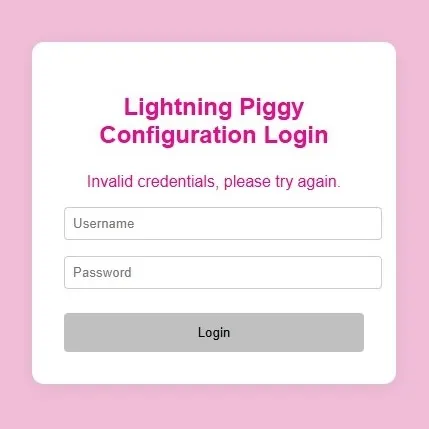
Configuration common mistakes Classic
Device won't connect to wallet after configuration.
https://). Note: For MicroPythonOS piggies the full https:// URL is used. Settings are case-sensitive - use YES not Yes. Apply case sensitivity to timezone and currency fields too.Lightning address use (e.g. satoshi@lnbits.com) Classic LNbits
Some wallets can't scan a Lightning Address QR code.
Primal NWC wallet not working Classic MicroPythonOS NWC
Primal NWC wallet currently doesn't work with Lightning Piggy.
Display & QR Codes
Device Display Information Classic LNbits
The screen only displays "0 sats" i.e. there is no QR code on the screen to scan.
"NOBAT" is displayed on the screen, even though a charged battery is connected.
The system's battery detection relies on heuristics and is not always 100% accurate. Rapid voltage fluctuations lead to an assumption that the device is not on battery power, while very stable voltage suggests that it is running on the battery. If the battery is charged and you have a power cable connected, try disconnecting the power cable. Alternatively, if you wish to power the device by an external source (USB power), disconnect the device battery.
LNBits QR code does not change to Lightning Address Classic LNbits NWC
After configuring NWC with a Lightning Address, the display still shows the old LNBits QR code.
QR Code Scanner shows white screen (app) Classic
The QR scanner in the companion app displays a blank white screen instead of the camera view.
Battery Classic
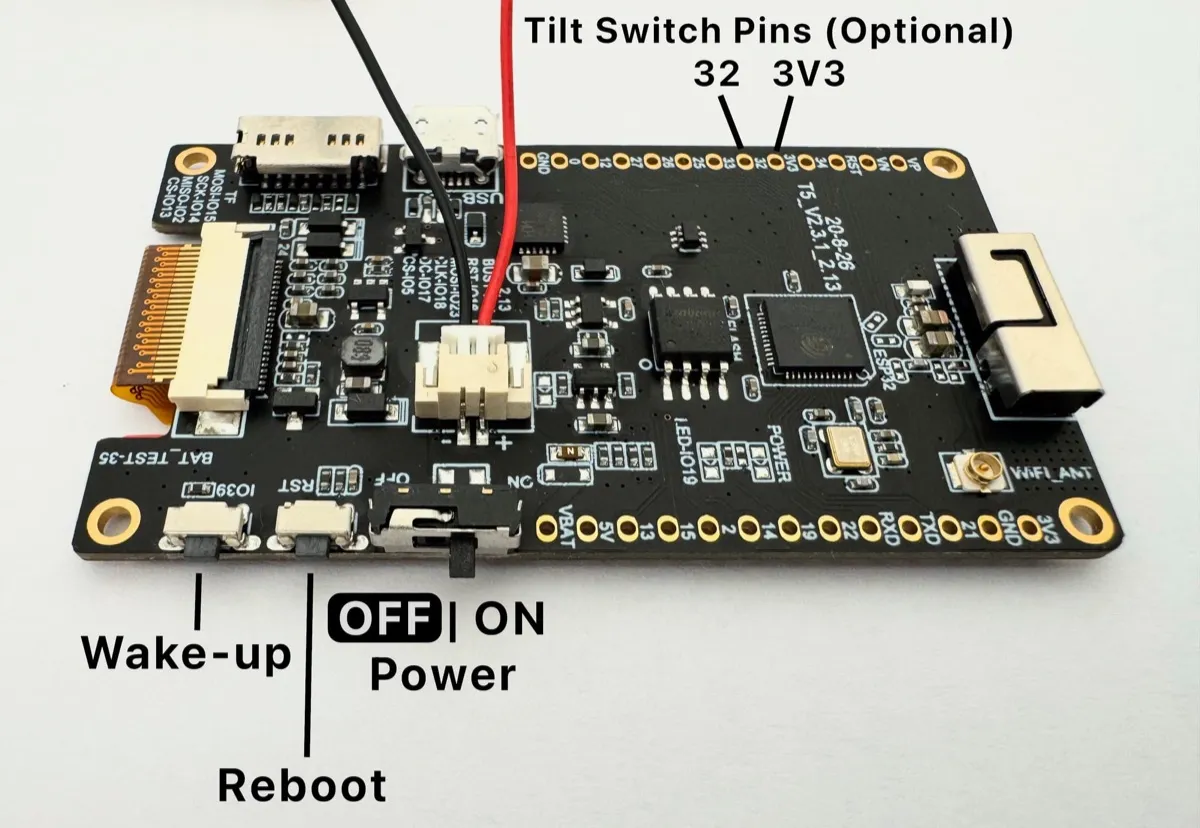
Unsure if the battery is working correctly?
App & Firmware
Update MicroPythonOS before installing the Lightning Piggy app MicroPythonOS
MicroPythonOS app store fails to install Lightning Piggy MicroPythonOS
The Lightning Piggy app cannot be installed from the MicroPythonOS app store.
Balance Bias setting not showing on restart MicroPythonOS
The Balance Bias configuration option disappears or resets after restarting the device.
Diagnostics and logging Classic
Need to debug device behaviour.
Serial Monitor MicroPythonOS
Need to monitor device logs in real time for debugging connectivity or display issues.
Building From Source Classic
MacOS iCloud and Arduino library conflicts
Community Q&A
Have a question not answered here? Join our Telegram group for live support from other Lightning Piggy builders.
If you've discovered a solution to a common problem, please share it with the community or email oink@lightningpiggy.com so we can add it here.